




Manage Conflict-of-interest risks
Tier Grow and Prosper+
Region US, AU and UK
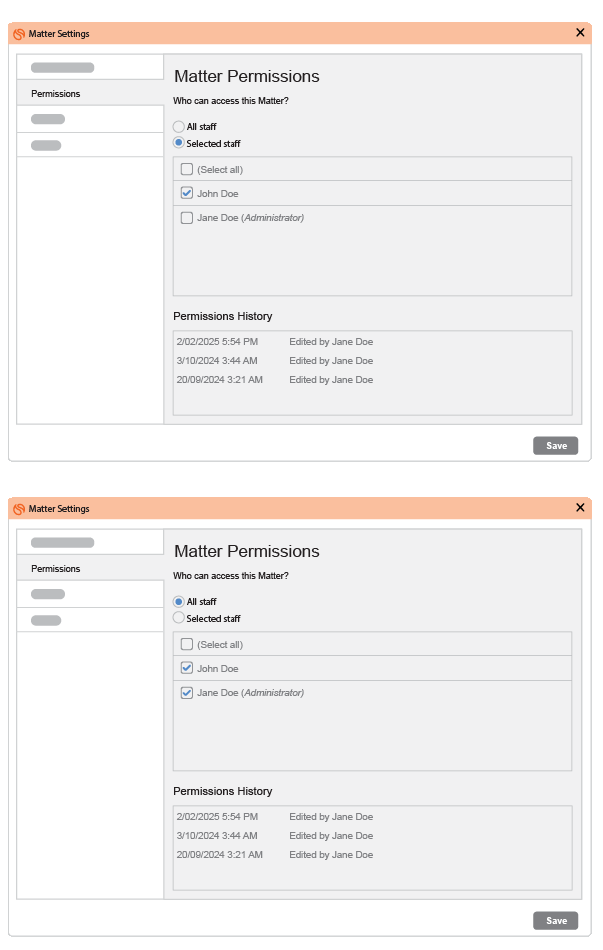
To help your firm stay compliant with conflict-of-interest protocols, Smokeball now gives you greater control over matter access.
With this update, firm owners will be able to restrict access to matters from other firm owners. It’s an easy way to safeguard confidentiality and reduce risk, especially in matters involving opposing parties or related clients.
🔒 Available from version 9.8 onwards.
Payment requisitions - a smarter, more secure way to manage trust and client account payments.
Tier Grow and Prosper+
Region US, AU and UK
Staff can now request payments without direct posting access, giving firm owners full control while keeping work moving. Built-in approvals let nominated users (like bookkeepers or practice managers) review requests to ensure compliance. Every approval is recorded on the payment detail PDF, creating a clear audit trail and peace of mind.
Smokeball mobile app update - iOS
Tier Boost, Grow and Prosper+
Region US, AU and UK
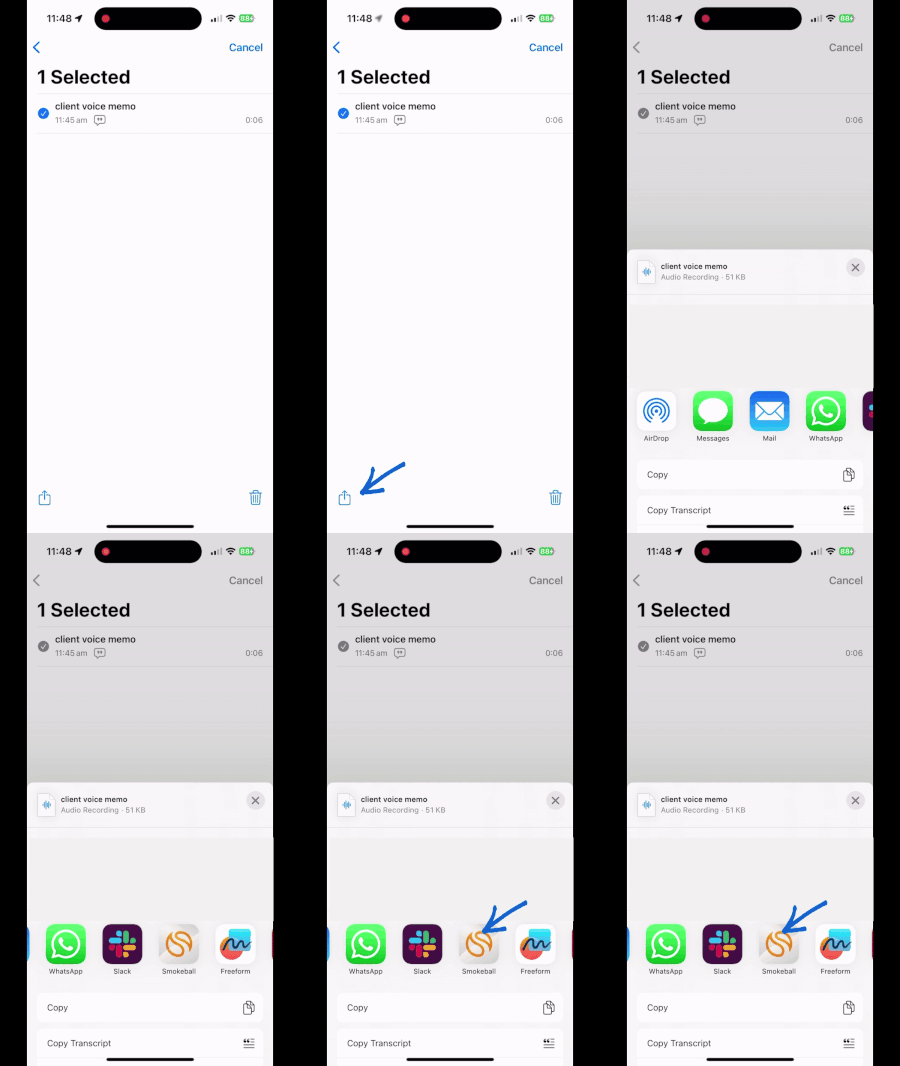
Smokeball’s iOS app now supports native sharing to matters using the iOS Share Sheet. You can now quickly send photos, text, voice recordings or links directly from other apps on your device into a matter in Smokeball, making it faster and easier to keep everything organised and in one place while on the go.
Reminder: Retirement of Automatic Invoice Saving to Documents Folder – Effective July 15, 2025
Tier Grow and Prosper+
Region US, AU and UK
What’s changing
As of July 15, 2025, finalized invoice PDFs will no longer be auto saved to the documents folder.
Why this change is happening
There are known limitations within the current system that have led to data inaccuracies and delays in end-of-month reporting. These issues are complex and not easily addressed within the existing setup.
After careful consideration, we’ve made the decision to retire this functionality to prioritize data integrity and simplify workflows. This is part of a broader effort to streamline recordkeeping and prepare for more robust, scalable solutions in the future.
What this means for you
- The feature remains active until July 15, 2025
- After that, it will be turned off
- You can still access, download, and share invoices from the Invoices tab in Smokeball Web
We appreciate your understanding as we work to improve the platform. If you need support, our team is here to help.
Reminder: Payment Plans & Card Safe Moving to Smokeball
Tier Smokeball Payments users only
Region US
To streamline your workflow, Payment Plans and Card Safe will no longer be available in the Smokeball Payments portal. From August 1, all actions must be managed directly within Smokeball.
What’s changing
Starting August 1, 2025, Payment Plans and Card Safe will no longer be accessible in the Smokeball Payments portal. All related actions will need to be completed directly within Smokeball.
Here’s what that means
💳 Card Safe
-
Store and charge cards on file directly in Smokeball
-
Charges apply only to outstanding invoices and go to your operating account
🔁 Payment Plans
-
Must now be created and managed in Smokeball
-
Apply only to outstanding invoices
-
Deposited into your operating account
-
Trust account plans will no longer be supported
Why this change is happening
By bringing these features into Smokeball, you get a simpler, more unified billing experience—with fewer steps and better integration across your matters and accounts.
What you need to do
Before August 1, 2025, review your existing payment plans in the Payments portal. If any plans are set to continue past that date, you’ll need to:
1. Save a credit card to the client’s payment profile in Smokeball
Follow these instructions to add a card
📣 This process will send a new Card on File request to your client for secure authorization.
2. Recreate any active payment plans in Smokeball
Follow these instructions to set up a plan
3. Cancel all pending or in-progress payment plans in the Payments portal to prevent clients from being double charged.
instructions here