I am new to Smokeball. I have Ringcentral as my telephone provider. I can get Ringcentral to record phone calls. I was told either Ringcentral or Smokeball could transcribe the recording and put it in the correct matter file. But I am having a lot of difficulty figuring out how to do this.
Anyone conquer this challenge?
Ross
Best answer by HunterSteele
Hi all,
Some great questions here and thank you @Sara Sultan for the call out.
Hopefully I can clarify some things around audio and transcription and also provide an update on future development.
Current Transcription implementation:
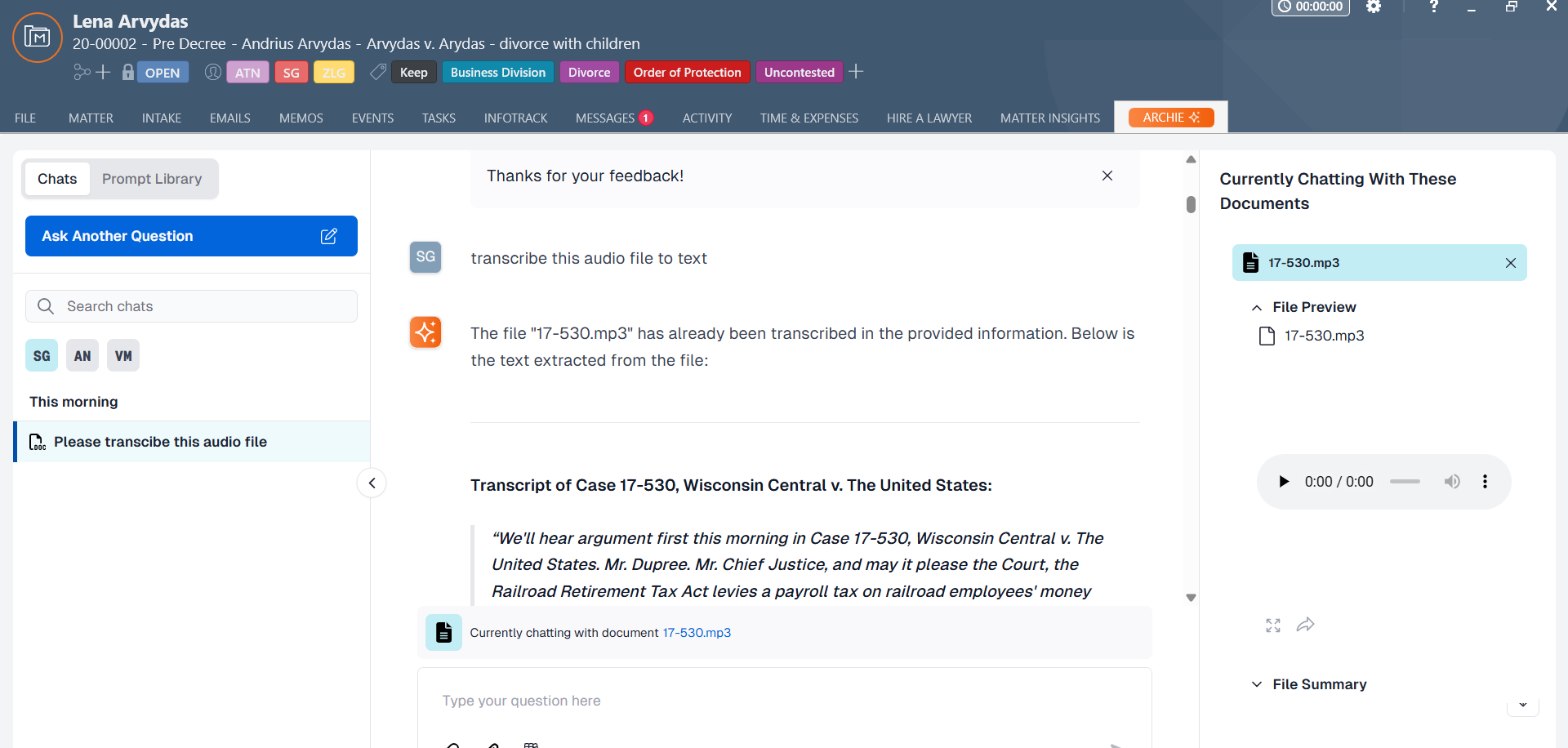
When an audio or video file with one of the following extensions (.mp3, .mp4, .mpeg, .mpga, .m4a, .wav, .webm) is added to a Smokeball Matter, we automatically run it through a transcription service on our server and save down the transcription text ready for use on our back end.
Currently we do not give access to this direct transcription text to the user as it is not formatted (it is just a raw text file with the words) in a way that would be very useful to view.
The reason we transcribe the document is so that it is accessible to Archie to be able to answer questions on (whether chatting with a whole matter or the specific audio file). Archie can summarise the audio, produce a followup email or letter or find specific things mentioned in the audio text.
The words “Transribe this file” doesn’t really mean much to Archie as it is just text. This is the part we are reviewing to produce a better result (see below).
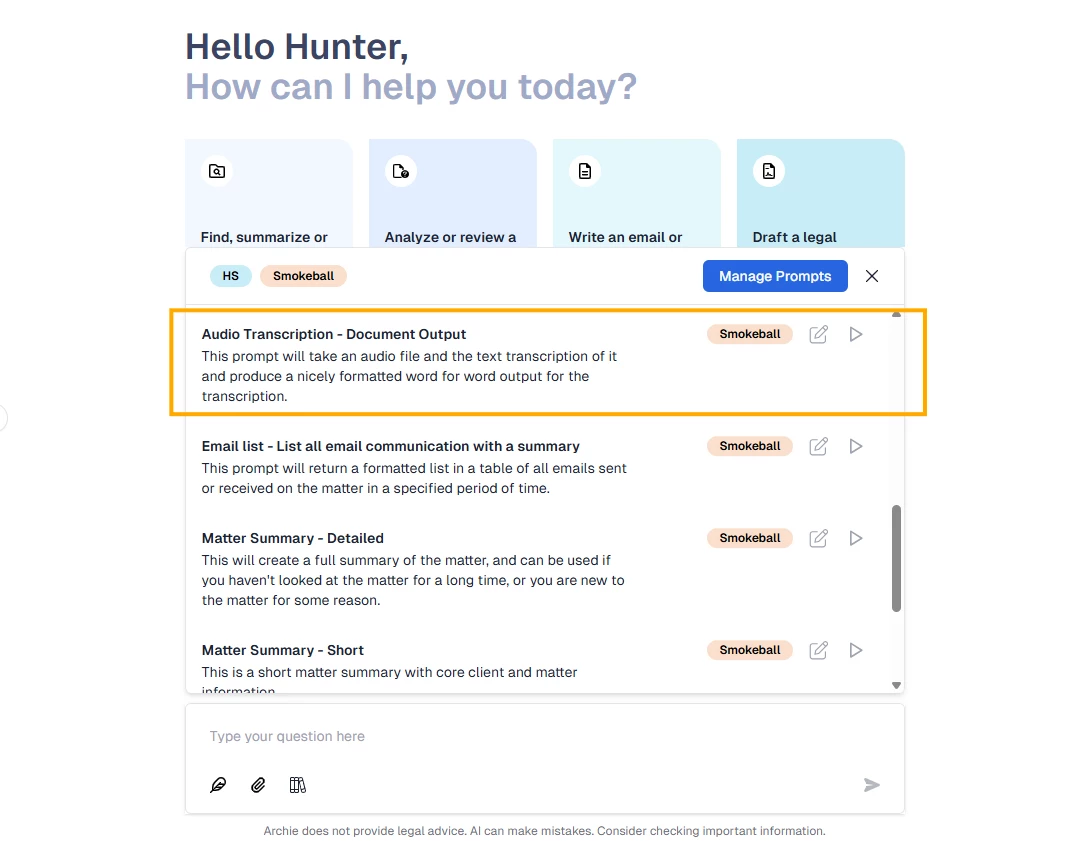
You can however ask Archie to produce a “formated view” of the attached “file” and it does a good job. We have just published a Prompt to the Prompt library for you called “Audio Transcription - Document output” which does a good job of this - feel free to use it - and if you want to modify it you can duplicate it and make it your own.
Upcoming refinements in this area:
We are looking to make the transcription available as formatted text on the matter alongside the uploaded audio file automatically in the future.
We are going to re-train Archie so that when you ask for a “Transcription” Archie will interpret that as asking for a formatted result of the word for word text in the audio file that was already transcribed, avoiding the need to run the template as suggested above.
You will need to upload the recording to the matter. This is not part of the RingCentral integration. Currently only our VXT integration saves the audio file and transcript automatically to the matter.
Once you have uploaded the audio file to the matter, you can ask Archie to create a transcript if you have Archie enabled.
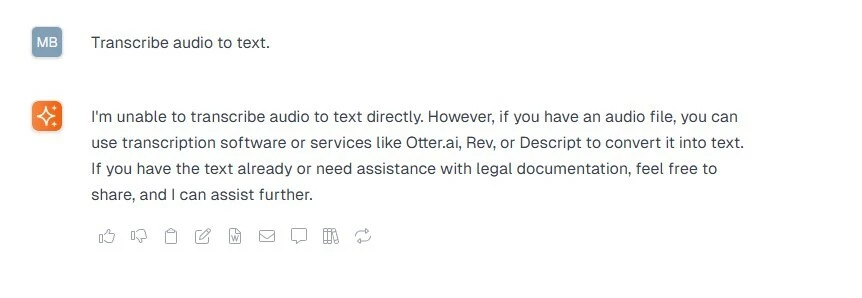
Hi - I’ve asked Archie to transcribe an audio file to text - but it says it can’t do that? I thought that is what it could do? I had an mp3 file loaded but haven’t included the title as it identifies my client.
@Matt_R_B & @Sara Sultan I have also encountered this. I believe I saw some promotional material that stated Archie could transcribe audio. I recall telling someone on the support line several months ago that it did not work. Below is a prompt and response from today (see Limitations section). @Matt_R_B to transcribe audio I have used Microsoft Office’s built in audio transcription for my own personal use. For a better formatted version I have also used Justice Text. Outcome depends on audio quality. ----- [Me] list all of the file formats you can ingest
[Archie] I can ingest and analyze the content of files provided in the matter documentation, as long as the relevant information is included or extracted for analysis. Below is a comprehensive list of file formats I can work with:
Text-Based File Formats
PDF: Portable Document Format files, including scanned documents (if text is extracted).
DOC/DOCX: Microsoft Word documents.
TXT: Plain text files.
RTF: Rich Text Format files.
Spreadsheet File Formats
XLS/XLSX: Microsoft Excel files.
CSV: Comma-separated values files.
Presentation File Formats
PPT/PPTX: Microsoft PowerPoint files (if text content is extracted).
Image File Formats
JPEG/JPG: Image files (if text is extracted or provided).
PNG: Image files (if text is extracted or provided).
TIFF: Tagged Image File Format (if text is extracted or provided).
Other File Formats
HTML: Hypertext Markup Language files (if text content is provided).
XML: Extensible Markup Language files (if text content is provided).
JSON: JavaScript Object Notation files (if text content is provided).
Limitations
Audio/Video Files: I cannot directly process these formats unless their content is transcribed or summarized.
Raw Image Files: I cannot interpret raw image files without accompanying text or extracted data.
Proprietary Formats: Files from specialized software (e.g., CAD files) are not directly accessible unless their content is converted into a supported format.
If you have files in any of the above formats, ensure their content is included or extracted in the matter documentation for me to assist effectively.
The support website says that it also does WEBM, but Archie is saying there is no content. @HunterSteele recently presented at the Smokeball breakfast and I’m sure it was mentioned that Archie could transcribe recordings that were uploaded.
@AMC Amanda - yes. I just attended the webinar on Archie prompts and the presenter definitely spoke about Archie transcription of the audio VXT being better than the VXT transcription.
Some great questions here and thank you @Sara Sultan for the call out.
Hopefully I can clarify some things around audio and transcription and also provide an update on future development.
Current Transcription implementation:
When an audio or video file with one of the following extensions (.mp3, .mp4, .mpeg, .mpga, .m4a, .wav, .webm) is added to a Smokeball Matter, we automatically run it through a transcription service on our server and save down the transcription text ready for use on our back end.
Currently we do not give access to this direct transcription text to the user as it is not formatted (it is just a raw text file with the words) in a way that would be very useful to view.
The reason we transcribe the document is so that it is accessible to Archie to be able to answer questions on (whether chatting with a whole matter or the specific audio file). Archie can summarise the audio, produce a followup email or letter or find specific things mentioned in the audio text.
The words “Transribe this file” doesn’t really mean much to Archie as it is just text. This is the part we are reviewing to produce a better result (see below).
You can however ask Archie to produce a “formated view” of the attached “file” and it does a good job. We have just published a Prompt to the Prompt library for you called “Audio Transcription - Document output” which does a good job of this - feel free to use it - and if you want to modify it you can duplicate it and make it your own.
Upcoming refinements in this area:
We are looking to make the transcription available as formatted text on the matter alongside the uploaded audio file automatically in the future.
We are going to re-train Archie so that when you ask for a “Transcription” Archie will interpret that as asking for a formatted result of the word for word text in the audio file that was already transcribed, avoiding the need to run the template as suggested above.
@HunterSteele thankyou so much for jumping in and clarifying. I also want to thank the support team who also reached out and have kept me updated on progress and fixes.
Sign up to see it all
Sign up for access to topics focused on your area of law, private groups and more.