Question

Starting with Smokeball and Outlook

  • June 17, 2025
  • 3 replies
  • 50 views

All:

Just started with Smokeball and was looking for an article or method to “sync” outlook with Matters.

Can anyone provide any direction or information?

Thanks….

Ben

3 replies

Hi Ben,


First, you’ll have to ensure your Outlook is connect to Smokeball. This should have been completed during your Onboarding, and if not, please reach out to your Onboarding Specialist to do so.

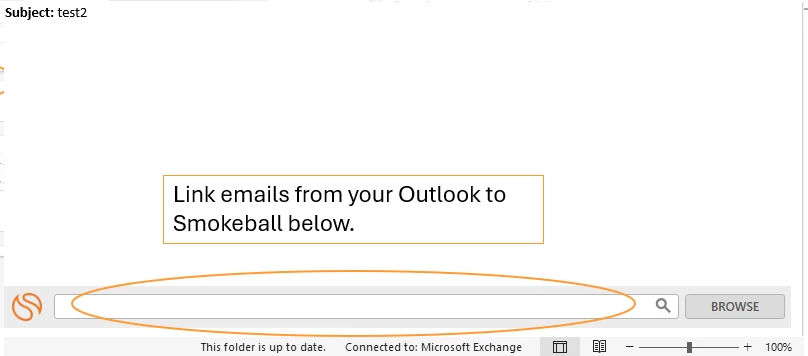
Once your Outlook is connected to Smokeball (or if it already is), you can link any email in your Outlook to a Matter via the search/browse bar at the bottom of the email, or by right clicking the email and choosing to associate the email with a Matter (should be the last option in the right click menu). A screenshot is below for reference.

In turn, you can generate new emails from Smokeball that send through Outlook. You can read more about that here.


  • Contributor
  • July 11, 2025

Hi Ben,


First, you’ll have to ensure your Outlook is connect to Smokeball. This should have been completed during your Onboarding, and if not, please reach out to your Onboarding Specialist to do so.

Once your Outlook is connected to Smokeball (or if it already is), you can link any email in your Outlook to a Matter via the search/browse bar at the bottom of the email, or by right clicking the email and choosing to associate the email with a Matter (should be the last option in the right click menu). A screenshot is below for reference.

In turn, you can generate new emails from Smokeball that send through Outlook. You can read more about that here.


Hi Josh, 

Ours has been linked, but it does not seem to be synching throughout each account. For example, if I save an email and another staff member has been copied to said email, the Smokeball category does not show up on their emails, but it does mine and vice versa. 

Is there any way to get them to sync as it means we are doubling up on saving emails. 

Thanks 


Hi there,

For this, the other person at your firm will have to also link that email themselves. This will then give them the Smokeball category as well. Do not worry about doubling up. Smokeball can detect dupes here and won’t re-save the same email if it’s already been saved. But, on the bright side, it will then be linked for that staff member.

As a best practice, it’s good for all firm staff to be linking their emails accordingly.