Question

Coauthoring/Collaborating on a Document?

  • July 31, 2025
  • 2 replies
  • 41 views

Folks:

One of the best features of Sharepoint/OneDrive is the ability for two (or more) people to collaborate on a single document in real time.  I believe this is possible with Google and other tools as well.

I saw that Jordan asked about this two years ago, and it was not then possible, but I am wondering if there has been any progress on this feature?

If not, how can I use Smokeball’s document storage and activity tracking features but also use OneDrive features?  I feel like I am being forced to choose.  Do I collaborate with client on a document that requires his input--which means that I have to export the document from Smokeball to OneDrive and share it with him from there, but then if I am going to edit it has to be the OneDrive version so that we are both aware of the other’s changes--but that means that I lose Smokeball’s task time tracker. . . 

Micah

2 replies

Sara Sultan
Smokeball Team
Forum|alt.badge.img+1
  • Smokeball Team
  • August 1, 2025

Hi Micah,

Thank you, as always, for your feedback.  I have heard this suggestion from others as well and know that our Product team is aware of the desire for this feature.  I will make sure to share with them all of your reasoning and feedback.


Funkytown
  • Frequent Scribe
  • August 18, 2025

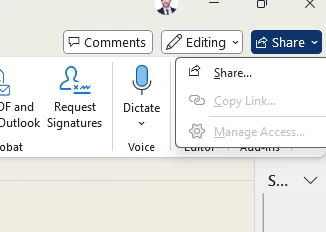
Once you’ve saved a document to Smokeball, you can select the “share” button in Word. The document is then linked to Smokeball, but is saved to your default OneDrive folder. I’ve checked. You can open the document through Smokeball or go to your default OneDrive folder and open it there. I’ve used this a few times - triple checking that the right version was in fact opening and saving. This is basically a technique to change Smokeball’s default save location - I think.